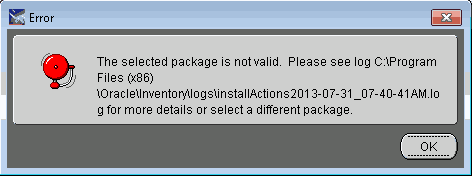
While trying to install a new full package, I selected the package name but when I clicked “Next” I received the following error:
The selected package is not valid. Please see log…

So, I checked the log and found that at the bottom of the log there several entries like the ones below:
INFO: 07/31/13 07:41:56.392 Validation of package in file \\WC-MR-VMDEPLOY\E910\package_inf\PD910B00.inf failed!!! Package validation failed. An existing package is installed, but we cannot get information about it from the file E:\E910\package.inf. Cannot get information about the package’s database. Cannot get information about the database from file E:\E910\package.inf. Cannot get information about the database. Reason: Cannot get information about the database from file E:\E910\package.inf. Empty file name for DataFileDestDirSPEC_PY910A00
Now, the odd thing is that PY910A00 is the name of an old PY package and the package that I selected was PD910B00. So, since it mentioned the package.inf file, I searched through it for PY910A00, the name of the old PY package. I found that there was an entry for it under the [Oracle Databases] section:
The selected package is not valid. Please see log…
So, I checked the log and found that at the bottom of the log there several entries like the ones below:
INFO: 07/31/13 07:41:56.392 Validation of package in file \\WC-MR-VMDEPLOY\E910\package_inf\PD910B00.inf failed!!! Package validation failed. An existing package is installed, but we cannot get information about it from the file E:\E910\package.inf. Cannot get information about the package’s database. Cannot get information about the database from file E:\E910\package.inf. Cannot get information about the database. Reason: Cannot get information about the database from file E:\E910\package.inf. Empty file name for DataFileDestDirSPEC_PY910A00
Now, the odd thing is that PY910A00 is the name of an old PY package and the package that I selected was PD910B00. So, since it mentioned the package.inf file, I searched through it for PY910A00, the name of the old PY package. I found that there was an entry for it under the [Oracle Databases] section:
SPEC_PY910A00=ORACLEI deleted that entry and saved the package.inf file. Clicked “OK” on the error. Selected my desired package again. Clicked “Next” and everything worked perfectly.


No comments:
Post a Comment